What is Captiva Software – Complete Guide
In the modern digital era, businesses handle massive amounts of documents every day. These documents include invoices, receipts, application forms, contracts, emails, and scanned files. Managing all of this manually is time-consuming, expensive, and often leads to human errors. To solve this problem, companies use intelligent document processing systems, and one of the most powerful solutions in this field is Captiva Software.
- What is Captiva Software?
- How Captiva Software Works
- Key Features of Captiva Software
- Benefits of Captiva Software
- Industries Using Captiva Software
- Challenges of Captiva Software
- Captiva Software vs Manual Processing
- Future of Captiva Software
- Real-World Example
- Why Captiva Software is Important
- FAQs
- Conclusion
- Related Post
Captiva Software is designed to automate document capture, data extraction, and classification processes. It converts unstructured information from paper or digital documents into structured, usable data that can be easily processed by business systems.Today, Captiva is widely recognized as part of OpenText Captiva, which is a leading enterprise solution for intelligent document automation and workflow processing.
Captiva Software automates document capture, extracts data using OCR, and improves accuracy, speed, and efficiency in business workflows.
What is Captiva Software?
Captiva Software is an advanced document capture and data extraction tool used by organizations to automate document-heavy processes. It uses technologies like OCR (Optical Character Recognition), artificial intelligence, and workflow automation to read documents and extract important information.Instead of manually typing data from papers or scanned files into systems, Captiva automatically reads the content and converts it into structured digital data.
For example, if a company receives an invoice, Captiva can automatically identify key details such as invoice number, supplier name, date, and total amount, and then send this data directly into accounting or ERP systems.This automation reduces workload and improves efficiency across business operations
How Captiva Software Works
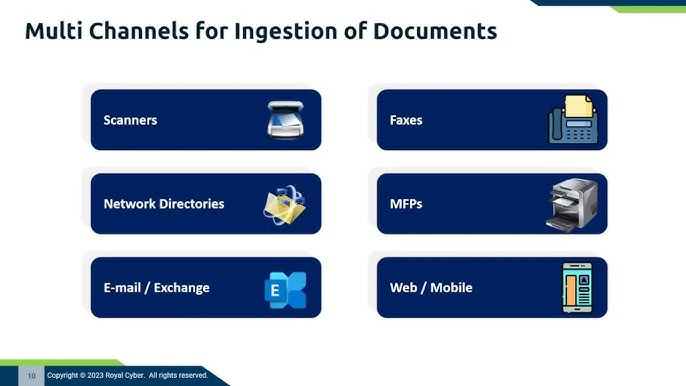
Captiva Software works by automatically capturing documents from different sources such as scanners, emails, cloud storage, or folders. Once the documents are received, it improves their quality by cleaning images and making text clearer for better processing. It then uses OCR (Optical Character Recognition) technology to read the content and convert it into digital data.
After that, the system classifies the document type, such as invoices, forms, contracts, or receipts, so it can process them correctly. It then extracts important information like names, dates, account numbers, and amounts. This data is checked through a validation process to ensure accuracy and completeness.
Finally, the verified information is sent to business systems like ERP or CRM for further use. This entire process reduces manual work, increases speed, and improves overall accuracy.
Key Features of Captiva Software
- Automatically captures documents from scanners, emails, and cloud sources
- Uses OCR technology to convert scanned text into digital data
- Classifies documents based on type such as invoices, forms, or contracts
- Extracts important information like names, dates, and amounts
- Validates data to ensure accuracy and reduce errors
- Supports workflow automation for faster document processing
- Integrates easily with enterprise systems like ERP and CRM
Benefits of Captiva Software
- Saves time by automating document processing tasks
- Reduces operational costs by minimizing manual data entry
- Improves accuracy and reduces human errors
- Increases productivity by streamlining workflows
- Enhances business efficiency with faster document handling
- Supports digital transformation and paperless operations
- Improves compliance with accurate and organized data management
Industries Using Captiva Software

- Banking and Finance for processing loans, forms, and transactions
- Healthcare for managing patient records and insurance claims
- Insurance for handling claim processing and policy documents
- Government sector for tax forms, applications, and records
- Education for student data, admissions, and certificates
- Logistics for shipping documents, tracking, and inventory records
Challenges of Captiva Software
- High implementation cost makes it difficult for small businesses
- Requires proper training due to complex system usage
- Initial setup and integration can be technically challenging
- Needs regular maintenance and updates for smooth performance
- OCR accuracy depends on good quality scanned documents
Captiva Software vs Manual Processing
- Captiva Software automates document handling, while manual processing requires human effort
- Captiva processes data quickly, whereas manual work is slow and time-consuming
- Captiva reduces errors through automation, but manual processing is more error-prone
- Captiva is highly scalable for large data, while manual processing has limited capacity
- Captiva improves efficiency, whereas manual methods reduce overall productivity
Future of Captiva Software

The future of Captiva Software is closely linked with advanced technologies like artificial intelligence, machine learning, and cloud computing. It will become smarter in understanding documents, including handwritten text and complex data formats. Future updates will likely offer faster real-time processing, better accuracy, and deeper integration with enterprise systems. As businesses continue to move toward digital transformation, Captiva Software will play an even more important role in fully automated and paperless workflows.
Real-World Example

A real-world example of Captiva Software can be seen in a bank that processes thousands of loan applications daily. Instead of employees manually reading and entering data from each form, Captiva automatically scans the documents, extracts important details like customer information and loan amounts, and updates the system instantly. This speeds up approval processes, reduces errors, and helps the bank serve customers faster and more efficiently.
Why Captiva Software is Important
Captiva Software is important because it transforms slow, manual document handling into fast and automated digital processing. It helps businesses capture, extract, and organize data with high accuracy, reducing human errors and workload.

By speeding up workflows and lowering operational costs, it allows organizations to focus more on productivity and decision-making. It also supports paperless operations, making businesses more efficient and digitally advanced.
FAQs
1. What is Captiva Software used for?
Captiva Software is used to automatically capture documents, extract data, and convert paper or digital files into structured usable information.
2. Is Captiva Software a scanning tool only?
No, Captiva Software is not only a scanning tool; it also uses OCR and automation to process and extract document data.
3. Which industries use Captiva Software?
Captiva Software is used in banking, healthcare, insurance, government, education, and logistics for handling large volumes of documents efficiently.
4. Does Captiva Software support automation?
Yes, Captiva Software fully supports automation by capturing documents, extracting data, validating information, and integrating it into business systems automatically.
5. What are the main benefits of Captiva Software?
Captiva Software improves speed, accuracy, productivity, reduces costs, and supports digital transformation by replacing manual document processing with automation.
Conclusion
Captiva Software is a powerful document capture and automation solution that helps businesses convert paper and digital documents into structured data. It reduces manual work, improves accuracy, and increases efficiency across industries. By using advanced OCR and automation technologies, it supports digital transformation and faster workflows, making organizations more productive, cost-effective, and ready for modern data-driven operations.